Celebrate a loved one’s graduation with a unique gift from Photo Evo. With their broad range of personalized items, including everything from mugs to big heads to yard signs, you’re sure to find the perfect keepsake for your family’s special occasion.
Looking for custom gifts for a wedding celebration? We offer a variety of personalized items, from wedding invitations to wedding booklets and wallet prints, providing a thoughtful way to celebrate the newlyweds or commemorate their special day.
We take pride in offering an extensive selection of custom items, ranging from charming holiday cards to custom ornaments and beyond, ensuring that you’ll find the perfect heartfelt gift to make your holiday celebrations truly memorable.
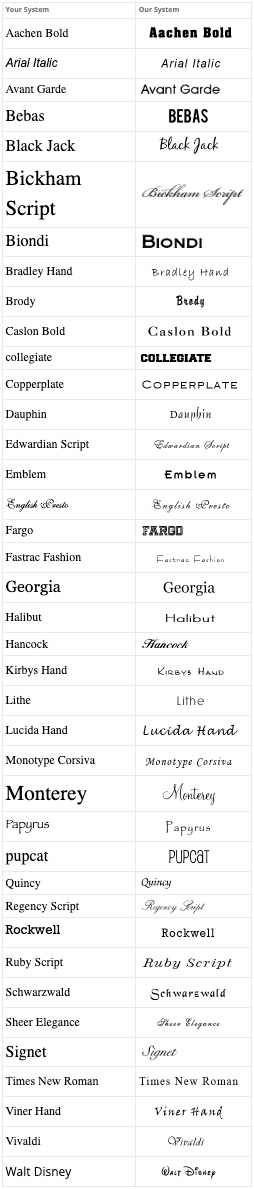
Photo Evo makes use of a number of different fonts that may or may not be installed on your computer. Install them so you know for sure that the text you see in the templates is displayed how it will be printed.
Download the fonts and install them. When you have installed them correctly, the type displayed in the left column (Your System) of the table below should closely match to the type in the right column (Our System).
To install the fonts in Windows, unzip the downloaded file and put the fonts in your C:WindowsFonts folder.
To install the fonts on a Mac, put them in the /Library/Fonts folder if you are an administrator or /Library/Fonts folder if you are a user (not administrator).

© 2024 photo evo | All Rights Reserved | Privacy Policy